
Managing the schedule of workers and professionals in a medical setting is almost always a challenge. Although smaller facilities can handle work without complex solutions, larger institutions require tools capable of keeping clinics and hospitals functional.
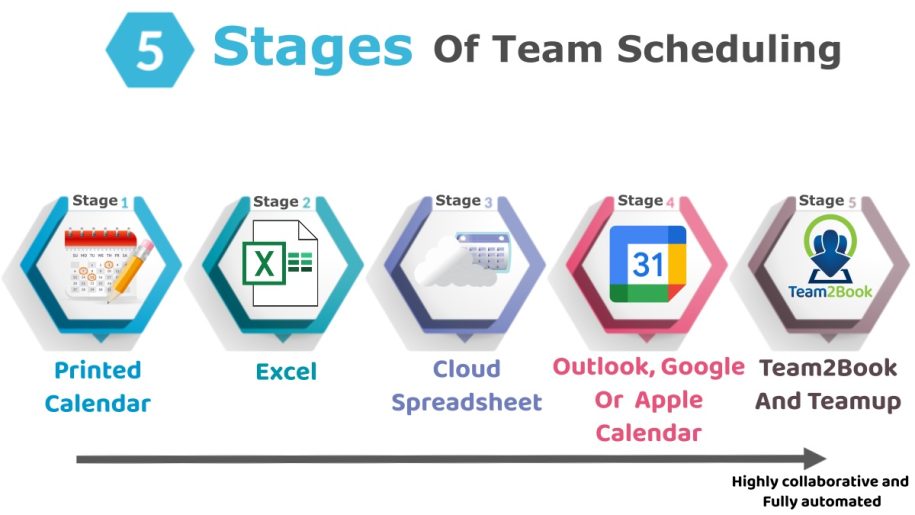
In most high-volume facilities, schedule management is an intricate process that becomes complicated as the number of doctors, nurses, and rooms increases. As such, many medical clinics in Quebec and other parts of Canada walk through the stages of team scheduling until they deploy the Team2Book Availability Scheduling App.
This article presents 5 stages of team scheduling for medical clinics, their advantages, and the disadvantages of using each scheduling method for managing the medical clinic calendar and resources. Keep reading to learn more!
Stage 1 – Using a Printed Calendar
A large portion of small medical clinics still use printed calendars for schedule management. It is simple to generate, providing important information about workflow for a few days or weeks for small teams and solo practitioners.

Advantages
- Easy to implement and needs minimal funding, with no requirement for training, setup, or specialized software installation.
- An administrator or secretary can easily handle calendar management.
Disadvantages
- Changes to the schedule require adjustment, reprinting, or rewriting of the calendar.
- Workers cannot access information remotely.
- This system does not offer access to notifications and automation.
- Managing complex shifts, schedule changes, and office space allocations is almost impossible with this method.
Stage 2 – Using Local Microsoft Excel Template
Small clinics that are growing and transitioning into medium to large facilities naturally abandon printed calendars and move to spreadsheet-based solutions like local Microsoft Excel templates. This computer-based solution allows administrators to input information, including workers’ names, shift allocations, dates, and room details.

Advantages
- This system is simple, flexible, and easy to use by most administrators.
- It offers healthcare facilities an enhanced structure due to the availability of formatting, formula features, and color coding, which enhances user readability.
Disadvantages
- Conflicts with Excel file versions can sometimes confuse administrators about which file is updated.
- This system is best managed by a single user, which also creates a bottleneck in large medical institutions.
- Updates and shift changes requests can slow down and may lead to conflicts and no-shows.
- Essential features like automatic room allocation, double-booking detection, and conflict identification are missing.
As you will come to see, most medical clinics can best handle their scheduling by transitioning to the Team2Book Availability Scheduling App.
Stage 3 – Using Cloud Microsoft Excel, Google Sheet, or Similar Tools
As a clinic grows, transitioning from local Excel templates to cloud-made spreadsheets improves visibility by offering users real-time access to scheduling.

Advantages
- Real-time access to the facility schedule via a link allows multiple users to view and update scheduling based on varying privileges.
- Scheduling is accessible via multiple devices.
- Users can view a schedule with different access privileges.
- Only one document exists, which reduces conflicts.
Disadvantages
- Despite increased accessibility, schedules can only be updated manually, making conflicts likely when allocating shifts and office spaces.
- Complex scheduling requirements are still challenging to manage using cloud-based spreadsheets.
Stage 4 – Using Google Calendar, Apple Calendar, and Outlook
Many calendar applications like Google Calendar, Apple Calendar, and Outlook offer medical facilities better scheduling options due to user friendliness and mobile accessibility. As such, shifts are assigned as calendar events while room allocation is managed through separate calendars.

Advantages
- Calendar applications offer excellent layouts for viewing monthly, weekly, or daily schedules.
- Many calendars allow administrators to drag-and-drop shifts and allocate resources, making changes easier to implement.
- This system is perfect for repetitive schedules.
- Improved accessibility as calendar applications are optimized for use on multiple devices.
Disadvantages
- Creating schedules and updating events is still done manually, increasing the likelihood of errors.
- Managing room use in real-time can be impossible.
- Administrators do not have access to statistics and other performance indicators that enhance future decision-making.
- Managing scheduling can be difficult in larger facilities.
Stage 5 – Using Teamup with Team2Book Features
Medical clinics looking to optimize scheduling must transition to the stage 5 team scheduling solution–Team2Book Availability Scheduling App.
Key Features
- This tool automatically assigns shifts to workers and professionals based on predefined rules.
- It allocates offices based on priority, workload, equipment requirements, and worker availability.
- Offers real-time notification of changes made to a schedule.
- Detects and notifies administrators when schedule conflicts occur.
- Automatically pairs doctors and other professionals with specialized nurses and other suitable assistants.
- Offers an option for dynamic configuration, easing modification to shifts and roles.
- Provides statistical insights to administrators.
- Offers a Real-time Locator feature, which is a visual map of a medical clinic. Therefore, it allows administrators to see who is working where and what resources are available.

Advantages
- Minimizes the need for hands-on management, allowing administrators to focus on the essential aspects of clinic operators.
- A manager can easily have an overview of a clinic’s situation using the Real-time Locator option.
- It minimizes the likelihood of errors like double-booking.
- This system is suitable for small, medium, and large-sized medical clinics.
- It enhances the overall patient experience by improving operational efficiency. For example, clinics with multiple waiting rooms can direct patients to the closest waiting room.
Disadvantages
- It requires initial configuration, which can be challenging for first-timers.
- Adopting the new system can take some time, especially when team members are used to the spreadsheet or paper method.
Conclusion
Team schedule management is an essential aspect of medical clinic administration. As such, many smaller facilities use the stage 1 option, which uses a printed calendar to manage schedules and resource allocation.
However, this method becomes chaotic once the workforce increases. At this point, stage 2 may be best, which is based on local spreadsheets like Excel templates.
Like the first stage, stage 2 collapses once the staff increases, making a transition to stage 3 (Cloud Microsoft Excel, Google Sheet, or Similar Tools) necessary. Google Calendar, Apple Calendar, and Outlook (Stage 4) offer better options to large institutions.
Yet, this option lacks automation options for rule enforcement, shift allocation, and room assignment. The Team2Book Availability Scheduling App is the stage 5 option, offering clinic administrators the best options of all other stages, plus automation advantages.